Computer-Aided Engineering (CAE)

Computer Aided Engineering

The computer-aided engineering (CAE) method mainly uses computers to analyse, design, and manufacture a product, project, and process. CAE relates to elements of CADD in industry. CAE often work as a recognised umbrella discipline that involves a lot of computer-aided technologies that are not limited to CAD, computer-aided industrial design (CAID), CNC, CAD/CAM, PDM and CIM, plus the Internet and other technologies that collaborate on various projects. Talking about CAE it often focuses on mechanical design and product development automation.

Its most familiar elements of CAE where simulation and solid modelling, analysis, optimisation and testing of mechanical structures. It adds a system that uses digital prototypes. FEA is a kind of process that is often associated with Computer-Aided engineering. 

Design application

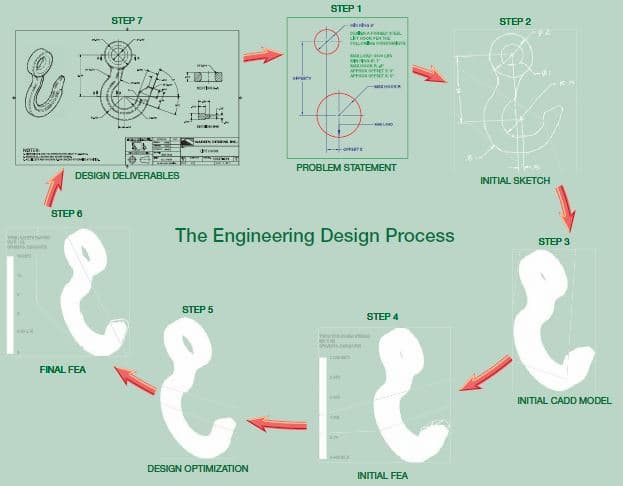
Computer-aided design and drafting (CADD) service companies relate to computer-aided technologies that offer revolutionary tools for engineers and drafters during the engineering design process. CADD enhances design efficiency, creativity, and effectiveness in product development. There are a lot of different forms that accept engineering design processes and integration of CADD within the engineering design process. Get a simplified sample of an engineering design process for a lifting hook.
Computer-Aided Engineering (CAE)

The lifting hook is one best example, and the following information is an introduction to CADD in the engineering design process.

STEP – 1

Step 1 helps to identify the problem along with adding design constraints. It comes with a constraint and a condition adding a specific shape, size, or requirement. It defines a design that satisfies to achieve a successful design. The problem statement describes the requirements and constraints for a forged-steel lift hook that support a 3000-pound load.

STEP – 2

Step 2 offers a sketch of the initial design based on the solution to the problem. The sketch comes with hand-drawn that use CADD as a sketching tool. CADD systems require the creation of a digital sketch as an element of the CADD process. The hand-drawn sketches come with a common practice that especially comes during early design.

STEP – 3

Step 3 can generate an initial three-dimensional computer-aided design (CAD) solid model according to the hand-drawn sketch. Using finite element analysis (FEA) software, you can study the model. Here, FEA applies the finite element method (FEM) to solve mathematical equations related to engineering design problems, including structural and thermal issues.

STEP – 4

Step 4 offers structural stress analysis applied to that lifting hook to simulate a real-world lift.

STEP – 5

Step 5 optimise the design to reduce material with improving shape while maintaining a sufficient working strength. Users can perform design optimisation, adding manual calculations and tests and repeated FEA simulations. It offers an optimised lift hook with CAD solid model.

STEP – 6

Step 6 can re-analyse the model that confirms a solution to the design problem.

STEP – 7

The last step 7 is to use the CAD solid model to prepare two-dimensional (2-D) detail drawings and a digital model format supported by computer-aided manufacturing (CAM) software. The manufacturer mainly uses the supplied data to create the forging equipment necessary to produce the lifting hook.

Professional approched

A wide variety of jobs are currently available for qualified CADD professionals. Note that the kinds of tasks they may allow is always traditional. In addition to this, they create drawings that are responsible for working in some of the following areas, including:

  • To prepare freehand sketches on the shop floor and convert the sketch with finished CADD drawing.
  • To include Digital image creation and editing.
  • To provide text documents, including proposals, reports, and studies.
  • To incorporate CADD images and drawings into text documents.
  • To conduct research for job proposals, purchasing specifications and feasibility studies.
  • To evaluate and test new software with ease.
  • To train the staff members by using new software or procedures.
  • To collect vendor product information for new projects.
  • To speak on the phone and deal personally with clients, vendors, contractors, and engineers.
  • To check design and drawings by creating accuracy.
  • To research computer equipment and prepare bid specifications for purchase.

Computer Aided Engineering

We often hire employees who possess good tech skills to become good employees. The best jobs that we can find here are those students who developed an excellent understanding of the project planning process and can easily handle any situation.

The process is based on the person’s ability to communicate. It helps to apply solid math skills through trigonometry with exhibiting good problem-solving skills. We know how to use resources and conduct research by getting all data. We can serve general qualifications foundation by adding more specific skills to our study. It includes good working knowledge of drawing layout and construction techniques. Based on applicable standards, it adds a good grasp of CADD software mainly used for creating models and drawings.

In addition, we support you in customising the CADD software that better suits your needs. What is most essential for the prospective drafter to remember. Content applies to the lot of details of an object, situation and procedure. If we are given enough time, then we can find all of the pieces of information required to complete a task.

Here the process refers to a method of doing something. It involves several steps that come with learning a helpful process and making it easier to complete all tasks. We can find all of the content you require and understand an exemplary problem-solving method. It comes with project planning and is used in any situation. We can use the process to make the task easier and determine what content would be beneficial.

There are many more reasons that we strongly recommend you focus on your efforts. We learn and establish good problem-solving habits. Using the skills to locate the content, all we need for any project is to make all aspects of your life productive, efficient, and relaxing. We at ASTCAD company are ready to offer excellent CAD Design and Drafting services. Contact Us to give wings to your project.

What is difference between CAD and CAE?u003cbru003e

CAD (Computer-Aided Design) and CAE (Computer-Aided Engineering) are both integral parts of the product development process, but they serve different purposes.u003cbru003eu003cbru003eu003cstrongu003eCAD (Computer-Aided Design):u003c/strongu003eu003cbru003e- CAD software is primarily used for creating 2D or 3D digital models of products or parts.u003cbru003e- CAD tools are focused on facilitating the design and drafting process, allowing engineers and designers to visualize and develop concepts.u003cbru003e- CAD software enables precise geometric modeling, drafting, and annotation of designs.u003cbru003e- It’s commonly used in industries like architecture, automotive, aerospace, and consumer goods for creating product designs, architectural plans, and engineering drawings.u003cbru003eu003cbru003eu003cstrongu003eCAE (Computer-Aided Engineering):u003c/strongu003eu003cbru003e- CAE software is used to simulate and analyze how products will perform under different conditions.u003cbru003e- CAE tools allow engineers to perform virtual testing, optimization, and validation of designs before physical prototypes are built.u003cbru003e- CAE encompasses various types of analyses including structural analysis, thermal analysis, fluid dynamics (CFD), and electromagnetic simulation.u003cbru003e- It helps in understanding product behavior, identifying potential issues, and optimizing designs to meet performance criteria and regulatory standards.u003cbru003e- CAE is commonly used in industries such as automotive, aerospace, energy, and manufacturing for design validation and optimization.

What does a CAE engineer do?u003cbru003e

u003cstrongu003eA CAE (Computer-Aided Engineering) engineer utilizes computer software and simulations to analyze, simulate, and optimize engineering designs and processes. Their responsibilities often include:u003c/strongu003eu003cbru003eu003cbru003eu003cstrongu003eSimulation and Analysis:u003c/strongu003e They use specialized software to simulate how products or systems will perform under different conditions. This could involve stress analysis, fluid dynamics, thermal analysis, or electromagnetics depending on the field.u003cbru003eu003cstrongu003eDesign Optimization:u003c/strongu003e They work to optimize designs to meet specified criteria such as performance, efficiency, safety, or cost-effectiveness. This involves running simulations with different parameters to find the best design solution.u003cbru003eu003cstrongu003eProduct Development Support:u003c/strongu003e CAE engineers often collaborate closely with design engineers to provide insights and feedback during the product development process. They may suggest design modifications based on simulation results to improve performance or reduce potential issues.u003cbru003eu003cstrongu003eValidation and Verification:u003c/strongu003e They validate and verify designs through simulation, ensuring that they meet industry standards, regulations, and customer requirements before physical prototypes are built.u003cbru003eu003cstrongu003eTroubleshooting and Problem Solving:u003c/strongu003e CAE engineers may investigate and troubleshoot issues that arise during product development or in existing products/systems, using simulation tools to diagnose problems and propose solutions.u003cbru003eu003cstrongu003eResearch and Development:u003c/strongu003e They contribute to ongoing research and development efforts within their organization, exploring new simulation techniques, software tools, or methodologies to improve the engineering design process.

JH

James Hartley

Senior Mechanical Engineer · BEng (Mechanical), UQ · Member, Engineers Australia · ASTCAD, Brisbane

James has 14 years of hands-on experience delivering CAD design, structural drafting, and engineering documentation across Australia’s mining, oil & gas, and manufacturing sectors. He specialises in SolidWorks, Autodesk Inventor, and AutoCAD for complex multi-discipline projects.

More articles by James Hartley →
What is Engineering Prototyping

Prototyping

A prototype is a functional part model of design; it is used as the basis for continuing the production of the final part or assembly. The terms prototype and model are often used interchangeably. Prototypes are used to determine if a new design works as intended. A prototype is commonly used as part of the product design process to enable engineers and designers to explore design alternatives, determine unknown characteristics in the design, finalize part tolerances, confirm customer interest in the design, verify design performance, coordinate with marketing and sales, and test theories before starting full production of a new product. A variety of processes can be used to create a prototype. The processes range from creating a digital model to developing a solid physical model of a part directly from a 3-D CAD model data and to fabricating a model using standard manufacturing processes. A company generally contracts with another company that specializes in developing prototypes quickly and accurately. Some companies have their own prototype development departments. A prototype is generally different from the final production part because special processes and materials are used to quickly create a part that can be used to simulate the actual part.


The development phase of the design process is when a fully functioning prototype model is made that operates at the desired quality level. A physical prototype can be machined, molded, or created using rapid prototyping processes. Parts are assembled into the desired product and then tested to determine if the design meets specifi c product requirements such as weight and performance. The design might have to return to the concept phase for reevaluation if some aspects of the design do not perform as intended or manufacturing process appears to be too costly. After the functioning prototype has been built and tested, drawings are created for continuing to full production of the product.

Digital prototyping

digital prototyping model

A digital prototype is a computer-generated model or original design that has not been released for production. The most common and useful digital prototype is a 3-D solid model. A solid model digital prototype functions much like a physical prototype, is often just as or even more accurate, and can be subjected to real-world analysis and simulation. Digital prototyping is the method of using CAD to help solve engineering design problems and provide digital models for project requirements. Successful digital prototyping offers several ben-efi ts to the engineering design process. It provides companies with a deeper understanding of product function, enables the simulation of product performance as part of a complete system, offers interactive and automatic design optimization based on requirements, and assists other areas of product development and coordination.

Digital prototyping can support all members of a product development team and help communication. Designers, engineers, and manufacturers use digital prototyping to explore ideas and optimize and validate designs quickly. Salespeople and marketers use digital prototyping to demonstrate and describe products. Depending on product requirements and company practices, digital prototyping can reduce or eliminate the need for physical prototypes, which are often expensive and time-consuming to create and test. The figure shows an example of digital prototyping to model, analyze, simulate, and visualize products in a virtual environment.

Rapid prototyping

rapid prototyping model

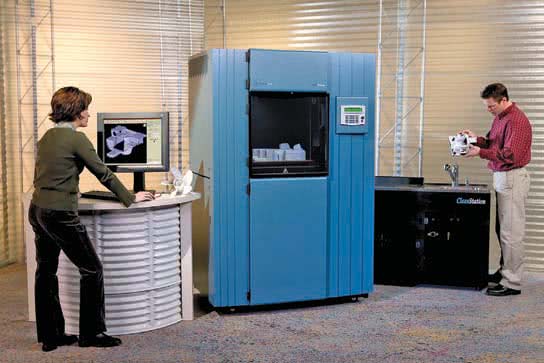
Rapid prototyping is a manufacturing process by which a solid physical model of a part is made directly from 3-D CAD model data without any special tooling. An RP model is a physical 3-D model that can be created far more quickly than by using standard manufacturing processes. Examples of RP are stereolithography (SLA) and fused deposition modeling (FDM), or 3-D printing.


Three-dimensional CAD software such as AutoCAD, Autodesk Inventor, NX, Pro/Engineer, and SolidWorks allows you to export an RP fi le from a solid model in the form of a .stl file. A computer using postprocessing software slices the 3-D CAD data into .005-.013 in. thick cross-sectional planes. Each slice or layer is composed of closely spaced lines resembling a honeycomb. The slice is shaped like the cross-section of the part. The cross-sections are sent from the computer to the rapid prototyping machine, which builds the part one layer at a time. The SLA and FDM processes are similar, using a machine with a vat that contains a photosensitive liquid epoxy plastic and a flat platform or starting base resting just below the surface of the liquid as shown in Figure. A laser-controlled with bi-directional motors is positioned above the vat and perpendicular to the surface of the polymer. The first layer is bonded to the platform by the heat of a thin laser beam that traces the lines of the layer onto the surface of the liquid polymer. When the first layer is completed, the platform has lowered the thickness of one layer. Additional layers are bonded on top of the first in the same manner, according to the shape of their respective cross-sections. This process is repeated until the prototype part is complete.


Another type of rapid prototyping called solid object 3-D printing uses an approach similar to inkjet printing. During the build process, a print head with a model and support print tip create the model by dispensing a thermoplastic material in layers. The printer can be networked to any CAD workstation and operates with the push of a few buttons as shown in Figure.


Rapid prototyping has revolutionized product design and manufacture. The development of physical models can be accomplished in significantly less time when compared to traditional machining processes. Changes to a part can be made on the 3-D CAD model and then sent to the RP equipment for quick reproduction. Engineers can use these models for design verification, sales presentations, investment casting, tooling, and other manufacturing functions. In addition, medical imaging, CAD, and RP have made it possible to quickly develop medical models such as replacement teeth and for medical research.

Rapid injection molding prototyping

rapid injection molding
prototyping by rapid injection molding
rapid injection molding protoryping

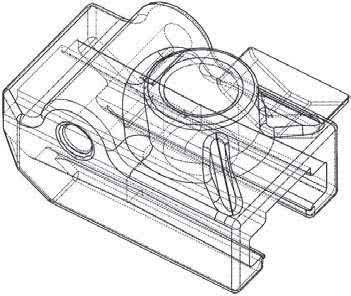
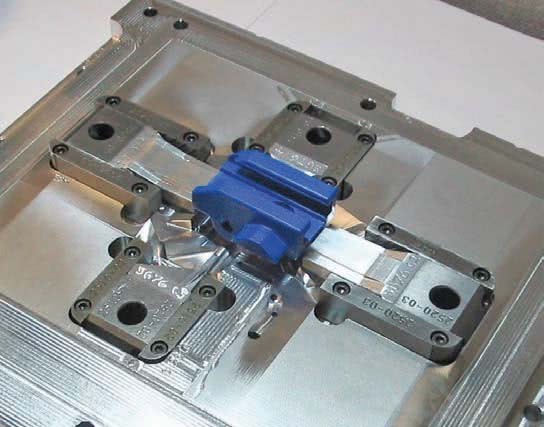
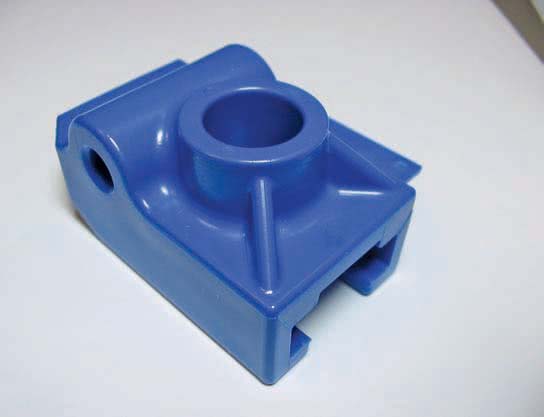
Rapid injection molding is an automated process of designing and manufacturing molds based on customer-supplied 3-D CAD part models. Because of this automation, lead time for the initial parts is cut to one-third of conventional methods. Cost-saving varies with the number of parts being produced, but rapid injection molding can also have a substantial cost advantage in runs of up to thousands of parts. Rapid injection molding produces quality molds using advanced aluminium alloys and precise, high-speed CNC machining. Parts can be molded in almost any engineering-grade resin. The figure shows the 3-D CAD part model, the injection molded part in the mold, and the resulting rapid injection molded part.

Subtractive rapid prototyping

Subtractive Rapid Pr ototyping
Subtractive Rapid
 Rapid Prototyping Subtractive

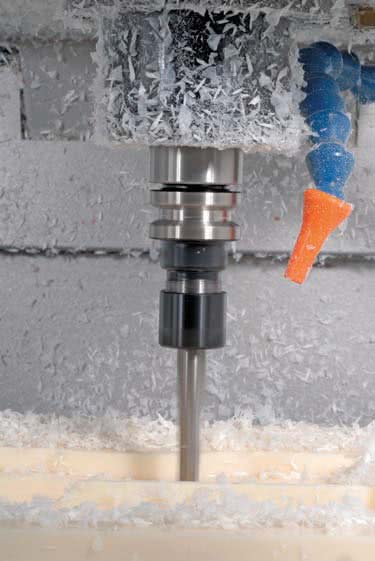
CNC machining of parts has been around for decades, but the use has typically not been applied to short lead-time prototype development. Subtractive rapid prototyping uses proprietary software running on large-scale computers to translate a 3-D CAD design into instructions for high-speed CNC milling equipment. The result is the manufacturing of small quantities of functional parts very fast, typically within one to three business days. A variety of materials, including plastics and metal, can be used with sub-tractive rapid prototyping. The figure shows the 3-D CAD part model, the CNC machining process, and the machined part.

Conventional machining prototyping

Some companies have a machine shop combined with the research-and-development (R&D) department. The purpose of the machine shop is to create prototypes for engineering designs. Drafters generally work with engineers and highly skilled machinists to create design drawings that are provided to the machine shop for the prototype machining. This practice generally takes longer than the previously described practices, but the resulting parts can be used to assemble a working prototype of the product for testing.

ASTCAD provide excellent service for CAD Design and  Drafting. Contact Us for more info

What are the prototyping techniques in engineering?

Prototyping is a crucial phase in engineering where initial designs or concepts are transformed into physical models or working versions of a product. There are several prototyping techniques used in engineering, each with its own advantages and applications. Here are some common ones:u003cbru003eu003cstrongu003e3D Printing/Additive Manufacturingu003c/strongu003e: This technique builds objects layer by layer from digital models. It’s highly versatile and allows for complex geometries.u003cbru003eu003cstrongu003eCNC Machiningu003c/strongu003e: Computer Numerical Control (CNC) machines use pre-programmed sequences to cut, drill, and shape materials with high precision. It’s suitable for producing functional prototypes from various materials like metal, plastic, or wood.u003cbru003eu003cstrongu003eInjection Moldingu003c/strongu003e: Ideal for producing large quantities of prototypes, injection molding involves injecting molten material into a mold cavity. It’s commonly used for plastics.u003cbru003eu003cstrongu003eVacuum Castingu003c/strongu003e: This technique involves making a silicone mold from a master model and then pouring a resin into the mold. It’s great for producing small batches of prototypes with properties similar to injection-molded parts.u003cbru003eu003cstrongu003eSheet Metal Prototypingu003c/strongu003e: Sheet metal can be cut, bent, and formed to create prototypes of metal parts or enclosures.u003cbru003eu003cstrongu003eLaser Cuttingu003c/strongu003e: Laser cutting uses a high-powered laser to cut through materials like acrylic, wood, or metal sheets. It’s useful for creating flat prototypes or intricate designs.u003cbru003eu003cstrongu003eFoam Modelingu003c/strongu003e: Foam blocks are carved or milled to create rough prototypes of products or parts.u003cbru003eu003cstrongu003eElectronics Prototypingu003c/strongu003e: Breadboarding and soldering components onto perfboards or custom PCBs are common techniques for prototyping electronic circuits.u003cbru003eu003cstrongu003eRapid Prototyping Techniquesu003c/strongu003e: These encompass various fast and low-cost methods like foam core modeling, cardboard modeling, or even LEGO prototyping for quick visualization and concept testing.u003cbru003eu003cstrongu003eSoft Prototypingu003c/strongu003e: Involves using flexible materials like fabrics or elastomers to create prototypes, commonly used in wearable technology or soft robotics.

What is prototype model in engineering?

u003cbru003eIn engineering, a prototype model is a preliminary version or representation of a product, system, or component that is created to test and validate design concepts, functionality, and performance before full-scale production. Prototyping is an essential step in the product development process as it allows engineers and designers to identify and address potential issues early on, saving time and resources in the long run.u003cbru003eA prototype model can take various forms depending on the nature of the project and the specific requirements. It could be a physical model made from materials such as plastic, metal, or composites, or it could be a virtual model created using computer-aided design (CAD) software or simulation tools.u003cbru003eu003cbru003eu003cstrongu003eThe primary purposes of creating prototype models in engineering include:u003c/strongu003eu003cbru003eu003cstrongu003eConcept Validationu003c/strongu003e: Prototypes help validate design concepts and ideas to ensure they meet the intended requirements and objectives.u003cbru003eu003cstrongu003eFunctionality Testingu003c/strongu003e: Engineers use prototypes to test the functionality and performance of a product or system under real-world conditions. This helps identify any flaws or limitations that need to be addressed.u003cbru003eu003cstrongu003eIterative Designu003c/strongu003e: Prototyping allows for an iterative design process where changes and improvements can be made based on feedback from testing and evaluation.u003cbru003eu003cstrongu003eUser Feedbacku003c/strongu003e: Prototypes can be used to gather feedback from potential users or stakeholders, providing valuable insights for refining the design and enhancing user experience.u003cbru003eu003cstrongu003eCost Reductionu003c/strongu003e: By identifying and addressing issues early in the development process, prototypes help minimize the risk of costly errors and redesigns during later stages of production.


JH

James Hartley

Senior Mechanical Engineer · BEng (Mechanical), UQ · Member, Engineers Australia · ASTCAD, Brisbane

James has 14 years of hands-on experience delivering CAD design, structural drafting, and engineering documentation across Australia’s mining, oil & gas, and manufacturing sectors. He specialises in SolidWorks, Autodesk Inventor, and AutoCAD for complex multi-discipline projects.

More articles by James Hartley →
what is engineering Drawing

Engineering drawing is a common language that describes the process of creating drawings for engineering and architectural application. The engineering drawings work the best and accept standards and format.

It offers an efficient way to communicate and use specific data with adding design intent. The Engineering drawings do not require work and interpret of others’ drawings. It comes with decorative drawings along with using artistic paintings. Using a successful engineering drawing, the user can describe a specific item that the drawing viewer understands without misinterpretation.

One can talk about the term engineering drawing, known for its Drafting, mechanical drawing, mechanical Drafting, engineering drafting, technical Drafting and technical drawing. The Drafting comes with a different graphic language that uses lines, symbols, and other notes to describe objects for an industry like manufacturing or construction. There are technical disciplines that use Drafting, covering civil, architecture, electrical engineering, electronics, piping, manufacturing, and structural engineering.

The term mechanical drafting comes with alternate meanings. The manufacturing industry comes with mechanical Drafting, where the name is derived from mechanisms. The construction industry uses mechanical Drafting in terms of drafting heating, ventilating, and air-conditioning (HVAC) systems. It comes with a mechanical portion of an architectural project.

Whereas if we talk about manual Drafting, it’s a term that describes traditional drafting practice, including pencil or ink onto a medium. It covers paper or polyester film, which supports drafting instruments and equipment. Computer-aided Drafting (CAD) has taken the place of manual Drafting, where the CAD uses computers for drafting. CAD also refers to computer-aided design when computers are used to design.

Engineering drawing

Engineering drawings add various concepts that cover instructions, engineering requirements, and proposals. It comes with multiple people and includes different individuals involved with a project. An engineering drawing comes with a complete set of engineering designs that offer data needed to manufacture an item or product. It includes machine parts, consumer products and many more structures.

ENGINEERING DRAWING

The drawing study covers medical instruments that completely describe all geometric features’ location and size. Later, it identifies the characteristics of the part. It mainly uses the material along with manufacturing precision. Also, the medical instrument company uses the drawing to share the document design, which intends to be a part of manufacturing. Let’s say how difficult it can be to understand the engineering drawing.

ENGINEERING DRAWING AUSTRALIA

Actually, the engineering drawing comes with an architectural drawing that is mainly used for home re-modelling projects. The drawing uses one sheet in a set of communication with architectural style, size, and location with building features and taking care of the construction methods and materials.

The drawing offers sheets that communicate architectural style, the size and location of building features, and construction methods. The drawings are set to obtain to pay for construction, make permits and legally begin construction. It offers accurate cost estimates that bring impossible and impractical construction without engineering drawings.

Computers In Design and Drafting

The computers offer revolutionised business along with adding industry process. It covers design and drafting practices with ease. Computer-aided design and drafting (CADD) is a process that uses a computer with CADD software for design and drafting applications. Also, the software is a program that enables a computer to perform specific functions and accomplish a task. Talking CAD is the acronym for computer-aided design, referred to as computer-aided Drafting.

Computer-aided design and computer-aided Drafting offer specific aspects of the CADD process. It mainly uses CADD for the design and drafting process to get accurate and faster CAD design. Several industries mostly use engineering and architecture to get a better outcome. Most engineering industries and educational institutions use manual drafting practices that evolved to CADD.

Whereas CADD allows drafters and designers to produce accurate drawings with neat and matched industry standards. CADD makes architectural drawings with artistic flair lettering and line styles, including a matched appearance with the finest handwork available. In addition to this, CADD drawings come consistently from one person or company to the next. It supports enhancing the ability of designers and drafters, adding creativity to it. It uses new tools such as solid modelling, animation, and virtual reality.

We are an excellent ASTCAD Service company that provides the best CAD Design and Drafting. Contact Us to get more information.

What is basic engineering drawing?

Basic engineering drawing refers to the fundamental principles and techniques used to create clear, accurate, and standardized drawings that convey technical information effectively. These drawings serve as a visual representation of objects, components, or structures, and they are essential for communication, documentation, and manufacturing processes in engineering disciplines such as mechanical, civil, electrical, and architectural engineering.u003cbru003eHere are some key aspects of basic engineering drawing:u003cbru003eu003cstrongu003eOrthographic Projectionu003c/strongu003e: This is the primary method used to represent objects in engineering drawings. It involves creating multiple 2D views of an object from different perspectives (front, top, side, etc.) to fully describe its shape and features.u003cbru003eu003cstrongu003eDimensioningu003c/strongu003e: Dimensions are added to engineering drawings to specify the size and location of features accurately. This includes linear dimensions (length, width, height), angular dimensions (angles), and geometric dimensions (tolerances, concentricity, symmetry, etc.).u003cbru003eu003cstrongu003eDrawing Standardsu003c/strongu003e: Basic engineering drawings adhere to standardized conventions and symbols to ensure consistency and clarity. Common standards include ASME Y14.5 for dimensioning and tolerancing, ISO 128 for technical drawings, and specific industry standards as needed.u003cbru003eu003cstrongu003eLine Types and Weightsu003c/strongu003e: Different types of lines (e.g., continuous, dashed, hidden) and line weights are used to differentiate between different elements of the drawing, such as object lines, dimension lines, and centerlines.u003cbru003eu003cstrongu003eTitle Blocku003c/strongu003e: Each engineering drawing typically includes a title block containing essential information such as the drawing title, scale, revision history, author, and date.u003cbru003eu003cstrongu003eSymbols and Notationsu003c/strongu003e: Symbols and abbreviations are used to represent specific features, materials, processes, and annotations on engineering drawings. These symbols help convey information concisely and universally.u003cbru003eu003cstrongu003eScaleu003c/strongu003e: Drawings may be drawn to scale to represent objects accurately relative to their actual size. Common scales include full scale (1:1), half scale (1:2), and so on.

What are engineering drawings used for?

Engineering drawings serve as the universal language of engineers, architects, and designers. They are used for several purposes:u003cbru003eu003cstrongu003eCommunicationu003c/strongu003e: Engineering drawings communicate the design intent and specifications to various stakeholders involved in the manufacturing or construction process. This includes engineers, fabricators, machinists, contractors, and inspectors.u003cbru003eu003cstrongu003eVisualizationu003c/strongu003e: They provide a visual representation of the final product, enabling stakeholders to understand how the object or structure will look and function.u003cbru003eu003cstrongu003eDocumentationu003c/strongu003e: Engineering drawings document the design, dimensions, materials, tolerances, and other critical information necessary for manufacturing or construction. They serve as a reference throughout the lifecycle of the product or project.u003cbru003eu003cstrongu003eQuality Controlu003c/strongu003e: Manufacturers use engineering drawings to ensure that the final product meets the required standards and specifications. They serve as a basis for quality control checks and inspections.u003cbru003eu003cstrongu003eLegal and Regulatory Complianceu003c/strongu003e: In regulated industries such as aerospace, automotive, and construction, engineering drawings are essential for complying with legal and regulatory requirements. They demonstrate that the product or structure meets safety, environmental, and other regulatory standards.u003cbru003eu003cstrongu003eModification and Maintenanceu003c/strongu003e: Engineering drawings are used for maintenance, repair, and modification purposes. They provide guidance on how to disassemble, repair, or modify a product or structure without compromising its integrity.u003cbru003eu003cstrongu003eCost Estimationu003c/strongu003e: By providing detailed information about the design and materials, engineering drawings help in estimating the cost of manufacturing or construction accurately.


JH

James Hartley

Senior Mechanical Engineer · BEng (Mechanical), UQ · Member, Engineers Australia · ASTCAD, Brisbane

James has 14 years of hands-on experience delivering CAD design, structural drafting, and engineering documentation across Australia’s mining, oil & gas, and manufacturing sectors. He specialises in SolidWorks, Autodesk Inventor, and AutoCAD for complex multi-discipline projects.

More articles by James Hartley →
difference between IGES and STEP Files

When sharing 3D CAD models between different software packages, engineers and drafters in Australia almost always reach for one of two neutral file formats: IGES or STEP. Both solve the same core problem — proprietary CAD files (SolidWorks .sldprt, Inventor .ipt, CATIA .CATPart) can’t be opened natively in competing software — but they do it differently, and the choice matters.

IGES vs STEP: Quick Comparison

IGESSTEP
Full nameInitial Graphics Exchange SpecificationStandard for the Exchange of Product Data
File extensions.igs, .iges.stp, .step
Developed1970s (US DoD / Boeing)1980s–1990s (ISO 10303)
StandardASME Y14.26MISO 10303
Geometry typesSurfaces, curves, wireframes, basic solidsSolids, surfaces, curves, assemblies
Tolerances❌ Not supported✅ Yes (PMI / GD&T)
Material data❌ Not supported✅ Yes
Assembly structureLimitedFull hierarchy preserved
File sizeSmallerLarger (more data carried)
Software supportAll major CAD systemsAll major CAD systems
Recommended forLegacy workflows, surface data onlyMost modern engineering exchange

What Is IGES?

IGES (Initial Graphics Exchange Specification) is the older of the two formats, developed in the late 1970s when the US Department of Defence needed a way to share CAD data between different defence contractors. Boeing and the US Air Force led the project — imagine coordinating an aircraft carrier or missile system across hundreds of suppliers all using incompatible CAD software.

IGES encodes geometry — curves, surfaces, wireframes — as a text-based file. It handles: basic 3D surface and solid geometry, 2D curves and wireframe elements, drawing annotation data (lines, text), and limited assembly structure. What it does not carry: GD&T / tolerance data, material properties, feature history, or robust assembly hierarchies. IGES essentially freezes the geometry as a snapshot — there’s no parametric history and no downstream data beyond shape.

When to use IGES