
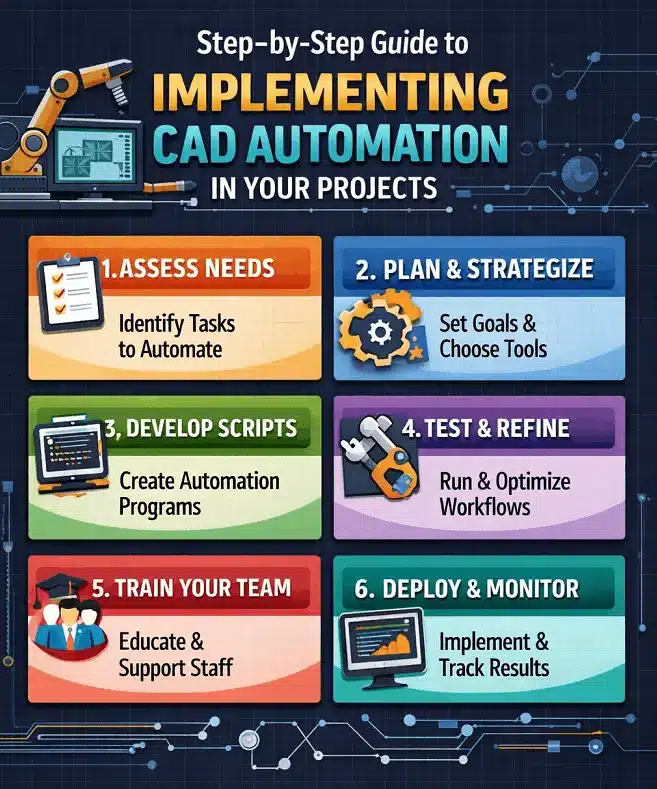
In today’s fast-paced engineering and construction environment, efficiency and accuracy are no longer optional—they are essential. This is where CAD automation plays a critical role. By automating repetitive drafting and design tasks, organizations can significantly reduce errors, improve productivity, and ensure consistency across projects.
What is CAD automation?
CAD automation refers to the use of scripts, macros, rule-based systems, and software integrations to automate repetitive and time-consuming CAD tasks. By following structured CAD automation tutorials, teams can standardize workflows, reduce manual intervention, and achieve faster project turnaround times.
Benefits of CAD automation
- Increased productivity by reducing repetitive manual tasks
- Improved accuracy through standardized rules and templates
- Faster project delivery with automated drafting workflows
- Cost savings due to reduced rework and errors
- Consistency across drawings regardless of project scale
Step 1: Identify repetitive tasks for automation
Common automation candidates include title block updates, layer creation and naming, dimensioning and annotation, block and symbol placement, file formatting and plotting, and BOM extraction.
Review completed projects and consult your CAD team to identify processes that consume excessive time. This step is critical in all CAD automation tutorials.
Step 2: Choose the right CAD automation tools
- AutoLISP for AutoCAD
- VBA and .NET APIs for advanced automation
- Scripts and macros for repetitive commands
- Parametric modeling tools
- Third-party CAD automation plugins
Step 3: Standardize CAD templates and libraries
Automation works best when your drawings follow consistent standards. Standardize drawing templates, layer naming conventions, dimension styles, text styles, and block libraries before writing any scripts or macros.
Step 4: Develop simple automation scripts
Start small with scripts that automate basic tasks such as layer creation or title block updates. Examples: automatically generate layers based on project type, insert standard blocks with predefined attributes, or batch rename drawing files.
Step 5: Test automation on sample projects
Always test automation on sample files before deploying across live projects. Verify drawing accuracy, check compliance with standards, ensure compatibility with existing files, and confirm output consistency.
Step 6: Train your team
Training should include how to run scripts and macros, understanding automation limitations, basic troubleshooting, and best practices for automation use. Encouraging feedback from users will help refine your automation system over time.
Step 7: Integrate with other systems
- CAD + ERP systems
- CAD + BIM platforms
- CAD + spreadsheet tools
- CAD + document management systems
Step 8: Monitor, optimise, and scale
CAD automation is not a one-time task. Regularly monitor performance, improve scripts based on user feedback, expand automation to new workflows, and document all automation processes.
Implementing CAD automation is a smart investment for organizations looking to improve productivity, accuracy, and consistency. Contact ASTCAD to learn how our CAD automation services can streamline your drafting workflow.
What are CAD automation tutorials used for?
CAD automation tutorials help you streamline repetitive drafting tasks using scripts, macros, and built-in tools, which is essential for Australian firms managing large-scale projects across construction, engineering, and surveying sectors. Our tutorials guide you through automating common workflows like layer management, dimensioning, and compliance with Australian standards, ultimately reducing manual errors and freeing your team to focus on complex design work. We’ve found that implementing automation can significantly accelerate project timelines while maintaining the precision required for local council approvals and building code compliance.
Is CAD automation suitable for small projects?
Yes, CAD automation is beneficial for all project sizes, including small ones. We find that even basic automation routines can significantly reduce manual drafting time and minimise errors in your designs. For smaller Australian projects, you might start with simple tasks like standardising your line weights to comply with AS/NZS standards or automating common detail blocks. This approach lets you experience productivity gains without major workflow disruption, making it an ideal entry point before expanding automation across larger projects.
Do I need programming skills for CAD automation?
No, you don’t need programming skills to get started with CAD automation. We offer user-friendly tools and templates that allow Australian drafters and engineers to automate common tasks like layer management, title block updates, and repetitive drawing commands without any coding. For more advanced automation tailored to your specific workflows, our team can help you implement custom scripts, or you can develop basic automations using our intuitive interface. Most of our clients find that standard automation features save significant time on typical Australian building and construction projects right away.
What are the best CAD automation tips for beginners?
We recommend starting with simple repetitive tasks like generating standard title blocks or border sheets using our local Australian templates that comply with AS/NZS standards. Standardize your drawing conventions across your team first, then gradually introduce automation tools through our platform’s built-in features. Test all automated processes thoroughly in a controlled environment before rolling out to live projects, and invest time in training your team so they understand how to maintain and modify automation workflows. This staged approach helps Australian practices avoid disruptions while building confidence with CAD automation capabilities.
Can CAD automation reduce project costs?
Yes, CAD automation can significantly reduce your project costs. By minimizing design errors and rework, our automation solutions help Australian drafting teams work more efficiently, which directly lowers labour expenses and project timelines. We’ve helped many local engineering firms streamline their workflows, reduce manual drafting tasks, and deliver projects faster while maintaining quality standards. This means better margins for your business and faster turnaround for your clients.