
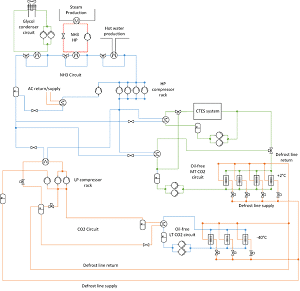
Intelligent P&IDs for piping systems are 2D Piping & Instrumentation Diagrams generated using symbols for equipment, instruments, components etc. and lines representing pipelines, instrumentation signal lines etc. as well as general elements, customized as per each client’s requirements. The information stored with each Intelligent P&ID consists of minimum required attributes for design, analysis, procurement, maintenance etc. The inputs for such intelligence would be from process flow sheets, instrumentation schematics, equipment data sheets, valve and instrumentation specification sheets, piping material specifications, etc. and can also be in the form of drawings and documents.
The P&ID database so generated from Intelligent P&IDs for the entire plant / project, when linked to the Central Database, the integrated Plant Information Management System, leads to numerous advantages over conventional non-intelligent P&IDs, as listed below.
Benefits for new “green-field” plants:
As project progresses, Intelligent P&IDs
- Captures, organizes and updates data related to design, procurement, construction etc.
- Provides single data entry with outputs such as Line List, Valve List, Equipment List, etc.
- Associates engineering data, drawings and documents to graphics.
- Checks the integrity between the processes captured in that and the corresponding intelligent 3D Plant model at all times and helps in resolving discrepancies between them.
- Alerts layout designers about process changes.
- Generates standard AutoCAD files with built-in intelligence. Highlights graphically in Intelligent P&ID the equipment, valves, instruments and specialties that are placed in the 3D Plant model.
- Generates reports on items placed in intelligent 3D Plant model in line with Intelligent P&IDs.
Benefits for operating “brown-field” plants:
- From database, plant operating and maintenance (O&M) personnel could at any time rapidly retrieve attributes of equipment, nozzles, pipe lines, valves etc.
- The plant O&M personnel could use it to arrive at alternate processes in case of failure of any equipment (such as a pump), leakage of a valve etc.
- The database can be extended to include customized inspection / maintenance management functions or can be linked directly to the client’s in-house database systems.
- This will also help in any future retrofit / expansion project.
What are the advantages of Pu0026amp;ID diagram?
u003cstrongu003ePu0026amp;ID (Piping and Instrumentation Diagram) diagrams offer several advantages in various engineering disciplines, particularly in process engineering and industrial settings:u003c/strongu003eu003cbru003eu003cstrongu003eClarity and Understandingu003c/strongu003e: Pu0026amp;IDs provide a clear visualization of the process flow, equipment, and instrumentation involved in a system, aiding in understanding the entire process at a glance.u003cbru003eu003cstrongu003eStandardizationu003c/strongu003e: Pu0026amp;IDs follow standard symbols and conventions recognized globally, ensuring consistency across different projects and industries. This standardization facilitates communication among engineers, operators, and stakeholders.u003cbru003eu003cstrongu003eDocumentationu003c/strongu003e: Pu0026amp;IDs serve as essential documentation for the design, construction, operation, and maintenance of a process plant or system. They provide a comprehensive reference for engineers, operators, and maintenance personnel.u003cbru003eu003cstrongu003eSafetyu003c/strongu003e: By depicting safety features such as relief valves, interlocks, and emergency shutdown systems, Pu0026amp;IDs help identify potential hazards and mitigate risks, enhancing overall safety in the process.u003cbru003eu003cstrongu003eTroubleshooting and Maintenanceu003c/strongu003e: Pu0026amp;IDs assist in troubleshooting issues and planning maintenance activities by providing a detailed overview of the system’s components and their interconnections.u003cbru003eu003cstrongu003eDesign Optimizationu003c/strongu003e: Engineers can use Pu0026amp;IDs to optimize the design of a process by analyzing the flow of materials, energy consumption, and equipment performance, leading to more efficient operations.u003cbru003eu003cstrongu003eRegulatory Complianceu003c/strongu003e: Pu0026amp;IDs aid in demonstrating compliance with regulatory requirements by documenting the design and operational aspects of a process, facilitating audits and inspections.u003cbru003eu003cstrongu003eTraining and Educationu003c/strongu003e: Pu0026amp;IDs serve as valuable educational tools for training operators and new employees, helping them understand the process and its components in a structured manner.u003cbru003eu003cstrongu003eIntegration with Control Systemsu003c/strongu003e: Pu0026amp;IDs provide the basis for developing control strategies and programming logic for automation and control systems, enabling efficient operation and monitoring of the process.u003cbru003eu003cstrongu003eCommunicationu003c/strongu003e: Pu0026amp;IDs act as a common language for communication among engineers, operators, contractors, and other stakeholders involved in the design, construction, and operation of a process plant.